
Personalized trip plans you can trust
Unique itineraries. Zero AI hallucinations.
A better way to travel
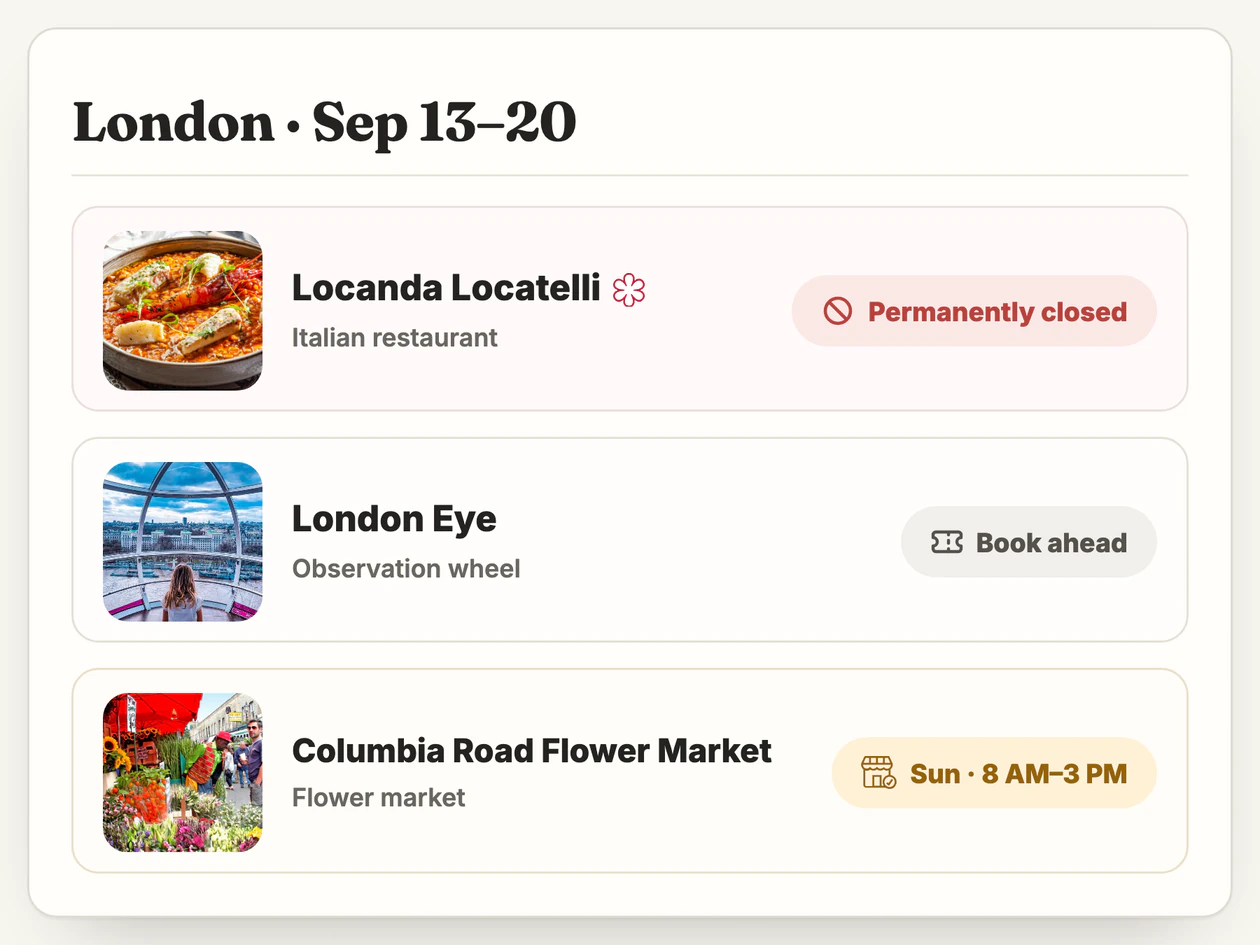
What's Open
We check each place against your dates for closures, limited hours, & what to book ahead
FAQs
What is TripSapien?
TripSapien creates personalized trip plans you can trust, with unique itineraries and zero AI hallucinations. Recommendations are curated, checked for your dates, and organized into neighborhood day plans.
- Start with the basics: Enter a city and travel dates. Interests, budget, saved places, and an AI-generated itinerary are optional.
- Checked for your dates: TripSapien flags known closures, limited hours, holiday changes, and advance-booking needs before you go.
- Share and export: Your finished trip includes a map and can be shared, exported, or added to Google Maps.
What does “Zero AI hallucinations” mean?
TripSapien does not invent recommendation names.
- Vetted catalog: Recommendations come from a vetted catalog of more than 600,000 places—not AI-generated names.
- Uncertain matches stay visible: If TripSapien cannot confidently match a name to a place in its catalog, it flags it for review instead of quietly adding it as a confirmed stop.
- Checked against your dates: TripSapien checks whether suggestions are likely to work during your trip, including known closures and schedule changes.
How are recommendations curated?
TripSapien prioritizes quality, then tailors recommendations to your interests, budget, trip length, and geography.
- Quality filters: Closed places, duplicates, obvious chains, and weak options are filtered out.
- Standouts first: Iconic sights and strong editorial picks appear first.
- Less backtracking: Recommendations favor neighborhoods already in your plan, helping each day stay compact and practical.
Can I add places I’ve already found?
Yes. You can start from scratch or build on research you have already collected.
- Import your research: Paste text, upload a .txt, .md, or .csv file, add a link, or import from Google Docs.
- Duplicates and unclear matches: Likely duplicates are merged, while ambiguous place names stay visible for your review.
- Plan around your priorities: Your places help determine which neighborhoods to group together and how much fits into each day.
What does TripSapien check for my dates?
TripSapien checks whether each stop is likely to be open and practical on the dates you plan to visit.
- Hours and status: Known opening hours and operating status.
- Date-specific changes: Closures during your dates, seasonal schedules, and public-holiday changes.
- Booking warnings: Limited hours, advance-booking requirements, and places likely to sell out.
How does TripSapien keep each day realistic?
TripSapien uses opening hours, expected visit length, travel time, and proximity to decide where each stop fits.
- Nearby stops stay together: Activities in the same area are grouped so you are not sent back and forth across the city.
- Manageable days: The plan limits major activities and leaves room for meals and optional evening stops.
- Adjust anything: Drag, reorder, set aside, or reset stops whenever you want.
How does TripSapien help me choose when to visit and how long to stay?
TripSapien shows a typical visit duration and when a place is usually busiest.
- Plan your time: Typical visit lengths distinguish a half-day museum from a quick photo stop.
- Avoid the busiest times: Popular-times data shows when a place is usually busiest.
- Compare quality signals: Ratings and review counts appear directly on each place row.
Will it show events during my trip?
Yes. TripSapien can add festivals and one-off events that overlap your travel dates.
- Matched to actual dates: An event is placed only on a date when it is scheduled to run.
- Relevant events first: Events matching your interests are prioritized, while major festivals can still appear without an interest match.
- Ticket links: TripSapien includes a ticket link whenever one is available.
Can I add my trip to Google Maps?
On desktop Chrome, the TripSapien extension can create a private Google Maps list for your trip in one click.
- Uses Google listings: Each stop is added using its Google listing, with its address or coordinates used as fallbacks when needed.
- Your Google sign-in stays private: Your Google login stays in your browser.
- Phone-friendly alternative: On a phone, TripSapien provides a list you can copy instead.
How can I share or export my trip?
Do I need an account?
No. You can build, edit, share, and export a trip without signing up.
- No sign-up required: Your trip links keep working even while you are signed out.
- Edit access stays with your browser: TripSapien stores the trip online, while a key saved in your browser preserves edit access on that browser.
- Sign in for other devices: Sign in with Google or an emailed magic link to save the trip to your account and open it on your other devices—no password required.
What's on around the world
Free · Instant · No sign up needed
Ready to build a trip that works?
Start with a city and dates. TripSapien adds curated recommendations, checks closures and booking needs, and builds realistic days.